How to measure AI search visibility with a ten-question audit
Build a repeatable ten-question AI visibility baseline, count domain citations and brand mentions, and keep incomplete answers separate from measured results.
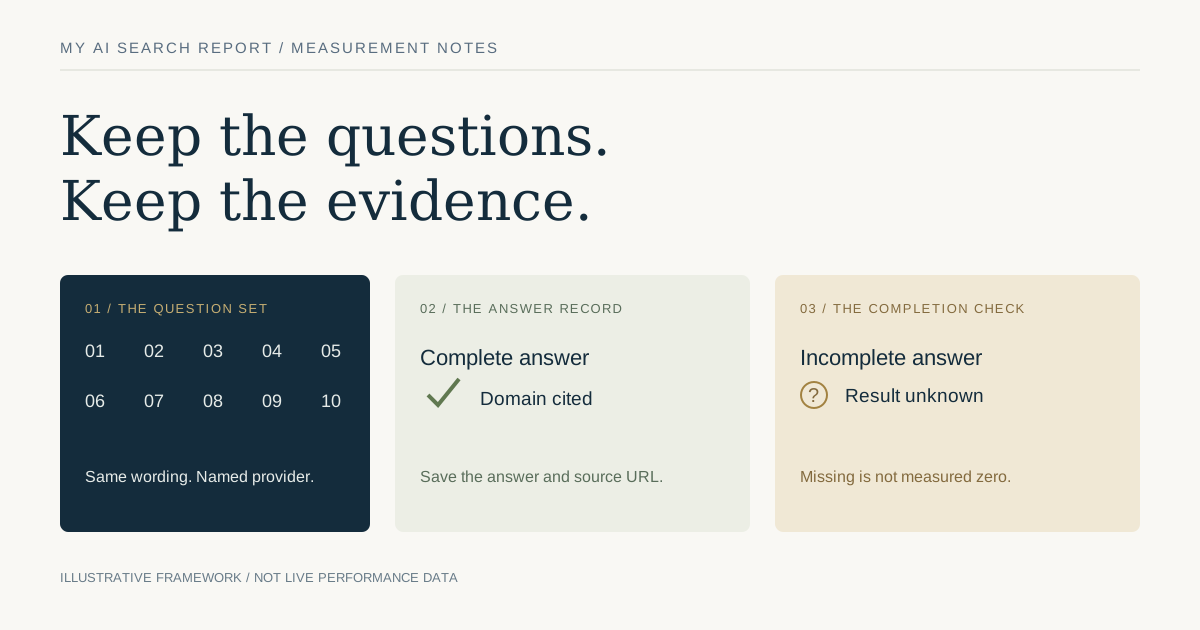
Measure an observation, not a universal AI ranking
To measure AI search visibility, choose a relevant set of questions, run the same questions through a named answer system and record whether each completed answer mentions your brand or links to your domain. Keep the answer, its source links and the test settings. Repeat the same test before deciding that a change helped.
A ten-question audit is a manageable starting point. It is a sample of ten chosen questions at a particular time, not your share of all AI searches. A technical readiness score, a brand mention, a domain citation and an actual visit are different measurements. Our guide to readiness and visibility explains those boundaries; this article gives you a practical measurement worksheet.
1. Choose ten questions your audience could actually ask
Start from the pages and services on the website. Choose questions that reflect a real decision, problem or comparison those pages can help with. For a specialist running shop, a question about choosing a shoe for wet trails is more relevant than a generic question about the largest sportswear brands.
Use a balanced initial set: three explanation questions, three selection questions, two comparisons and two practical troubleshooting questions. That split is a suggested editorial method, not an industry benchmark. Adapt it to the business and write down why each question belongs.
Keep your brand, domain and product URLs out of the questions when measuring unaided discovery. Asking an answer system to explain your own brand tests a different behaviour. Keep those branded checks in a separate set. Search-result questions can provide ideas, but the presence of a question in a search interface does not establish its search volume.
2. Freeze the question set and record the settings
Give the set a version, such as home-training-v1, and keep the exact wording. Record the tested domain, the provider, the model where exposed, the search or grounding mode, language, market where supported, the time and whether the test was run through an API or a consumer interface. Record any setting the interface does not reveal as unknown.
Do not silently replace a question that produces a disappointing answer. If the business changes, create a new question-set version and begin a new baseline. An API answer and a consumer chatbot conversation should remain separate observations even when their product names sound similar.
3. Keep a receipt for every answer
A useful worksheet has one row per question and per provider run. Preserve the returned answer and the citation URLs in a private record or a provider-permitted export. A dashboard total without the underlying evidence is difficult to investigate.
| Field | What to record |
|---|---|
| Question identity | Set version, question number and exact wording |
| Test context | Provider, exposed model, search mode, language, supported market and time |
| Completion | Complete, failed, truncated or unavailable |
| Brand mention | Whether the completed answer explicitly names the intended business |
| Domain citation | Whether an actual citation URL resolves to the selected domain |
| Evidence | Answer record, cited URL and a short note about relevance or factual errors |
Agree how to treat your apex domain and www host before the test. Do not count an unrelated domain that happens to contain the same letters. A brand mentioned in a third-party article is a mention; it is not automatically a citation to your own website.
4. Count mentions and citations separately
With ten complete answers, four answers citing the selected domain give an observed citation rate of 4/10, or 40 percent, for that question set and provider. If six answers name the brand, the observed mention rate is 6/10, or 60 percent. This is a hypothetical arithmetic example, not a result for this website or an expected performance level.
One answer can contribute to both counts. Several links to the same domain in one answer still count as one cited answer for this metric. Keep the number of individual links as a separate field if it is useful; do not inflate the answer rate by mixing those denominators.
Read the evidence as well as the count. A citation attached to an irrelevant paragraph or a mention containing a factual error deserves a note. Being named is not the same as being recommended, and a recommendation is not a verified sale.
5. Leave incomplete questions unknown
If only eight of ten answers complete and four cite the site, you have 4/8 among completed answers. For the full planned set, the citation result remains between 4/10 and 6/10 until the two missing answers are resolved. Those missing answers are neither confirmed absences nor confirmed successes.
Display completion beside every summary. A change from ten completed questions to six can make a percentage look better while reducing the evidence. Investigate authentication, provider failures, timeouts and truncated output before interpreting a movement as a visibility trend.
My AI Search Report distinguishes technical readiness from observed answer evidence and keeps incomplete observations visible. A combined score is a summary of its declared components; it does not turn a missing answer into a measured zero or establish a permanent search position.
6. Repeat the baseline before interpreting a change
Repeat the same set with the same available settings. If capacity permits, run it on more than one occasion before changing the site so you can see whether the answers vary. Keep the individual runs rather than retaining only the most favourable one. Do not describe a small convenience sample as statistically representative of the market.
Next choose one useful site improvement, such as repairing a blocked page, clarifying a product specification or adding evidence to a comparison. Note the deployed URL, the exact change and the date. Rerun the unchanged question set after the new page can be fetched, and compare the receipts. An observed increase after a change is a reason to investigate; on its own, it does not prove that the change caused it.
7. Use technical checks to explain possible gaps
For Google AI features, Google says supporting pages must be indexed and eligible for a search snippet. It does not require a special AI schema or an extra AI text file, and meeting the requirements does not guarantee inclusion. Start with access, readable content, canonical identity and relevant internal links before adding speculative markup.
Check a missing citation against the page that should answer the question. Can the page be reached? Does its visible content actually answer that question? Are statements specific and supported? Is the publisher clear? Structured data should describe that visible content, not add invented credentials, reviews or product offers.
Use the CheckMySchema inspector and our JSON-LD publishing checks for markup investigation. CheckMySchema is a separate Orvus network project; a markup check does not measure AI visibility.
8. Keep visits and commercial outcomes in a separate report
A citation can appear without a visitor clicking it. Separately monitor identifiable referral visits, engaged visits and the business actions you actually record in your analytics. Referral information may be missing or incomplete, so do not assume every visit without a recognisable AI referrer came from another source.
Google includes traffic from its AI search features in overall Web reporting in Search Console. Do not relabel all Google impressions or clicks as AI impressions or citations. Keep first-party reporting, provider answer observations and third-party search estimates in separate columns.
When comparing periods, use the same duration and acknowledge incomplete recent data. A sample citation rate answers a discovery question; analytics answers a visitor-behaviour question. Neither should be substituted for the other.
Your next useful measurement
Prepare the ten neutral questions, save the settings and run the first baseline. Review the cited pages, completion states and factual context before choosing a fix. Keep the original set so the next report is comparable.
You can start a check with My AI Search Report or follow the worksheet manually. Read the method and scope alongside the result. The aim is a repeatable observation that helps you make a better website decision, not a promise to be cited in every answer.
Sources and further reading
- Google Search Central: AI features and your website
- Google Search Central: get started with Search Console
- My AI Search Report: method and scope
Provider documentation can change. Check the current guidance before changing crawler or search settings.